Authentications
The node allows you to define authentication data, save them, and use them for a connection with data sources. The node includes two subnodes, namely OAuth2 App -> API and OAuth2 User -> API, which determine the type of authentication.
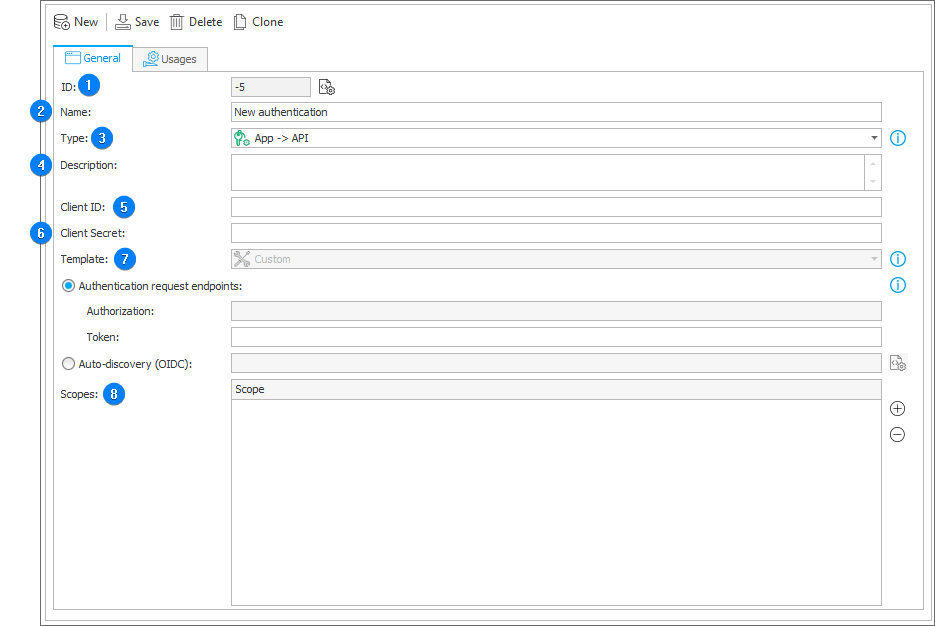
1. ID
The unique identifier of an element containing authentication data. A negative number displayed in this field indicates that the changes to the element have not been saved.
2. Name
The user-defined name of an element containing authentication data.
3. Type
The field allows you to select one of the two available authentication types:
- OAuth2 App -> API – authentication utilizes the OAuth2 Authorization Client Credentials Grant Flow (grant_type=client_credentials) to obtain an access token. This process does not require any action from the user. It is recommended to employ this authentication type in scenarios where the API connection is established within the context of a client application, rather than the current user.
- OAuth2 User -> API – the authentication uses the OAuth2 Authorization Code Flow (grant_type=authorization_code) method to obtain an access token. It may require the user to log in and grant the application the permission to access to their data.
4. Description
A optional, user-defined description for an element containing authentication data.
5. Client ID
A unique identifier assigned to the client by the authentication service provider during client registration. This identifier is used to identify the client when initializing the authorization process. In the context of OAuth2 User -> API authentication, the Client ID is sent to the authorization server to obtain the authorization code.
For the application used to communicate with identity providers, please register the following address as the Redirect URI:
https://dev18.webcon.pl/WEBCONBPS/OAuthFlows/ReceiveTokens
Please note that, depending on the identity provider, letter case may hold significance.
6. Client secret
A confidential key exclusively known to both the client and the authorization server. It is utilized to authenticate the client's identity, especially when converting an authorization code to an access token.
7. Template
This option is exclusively available for OAuth2 User -> API authentication. The authentication template allows you to either specify the URL addresses of an identity provider or choose from predefined options such as Google Identity or the Microsoft Identity Platform.
When opting for a predefined template, there is no need to manually input endpoint addresses for authentication requests. These details will be automatically retrieved from the Discovery-document provided by the Microsoft or Google identity platforms.
- Authentication request endpoints – you can enter the URL addresses used to execute authentication requests in two ways:
- by directly entering addresses: authorization address and token address;
- if the identity provider provides an auto-discovery document in the Open ID Connect standard (the so-called Discovery-document in the JSON format), you can enter the URL address of this document in the configuration. In such case, the authorization and token endpoint addresses will be retrieved from this file.
An example of discovery document: https://accounts.google.com/.well-known/openid-configuration
Scopes
This field allows you to specify the access scopes that the application may request during the authorization process. The defined scopes delineate the necessary information about the user and the type of access to assets required by the application from the authorization server.