General form field configuration
The form field window upper bar
The bar contains the basic buttons for creating and modifying the form field.
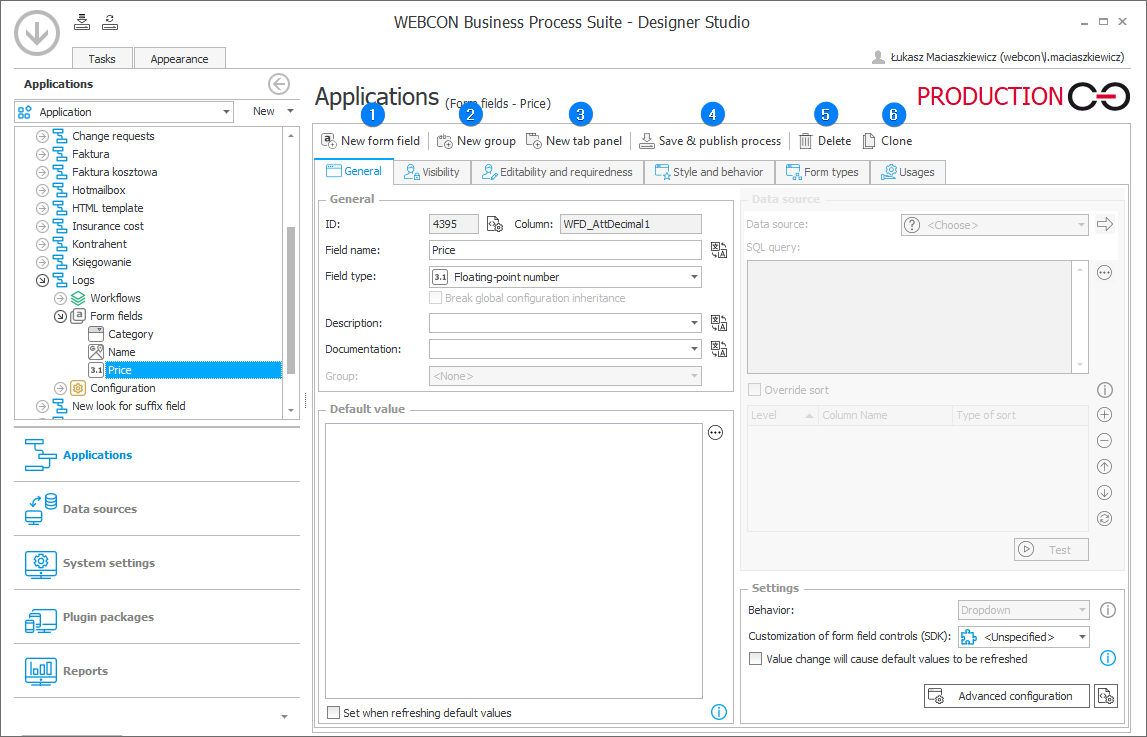
1. New form field
The button adds a new form field. Once you add a new form field, a configuration window appears below.
2. New group
The button adds a new group containing specified form fields. To learn more about form field groups go to the Groups and tabs subchapter.
3. New tab panel
By clicking the button, you can add a new tab panel. To learn more about tab panels go to the Groups and tabs subchapter.
4. Save & publish process
Saving inserted changes and publishing a process.
5. Delete
Deleting a selected form field.
6. Clone
The button clones a selected form field, i.e. creates a new form field that contains identical configuration to the source form field.
To make the created form fields visible on the form, you need to configure their visibility and availability on the Field matrix.
Tabs in the form field window
There is a form field configuration window with six tabs below the abovementioned buttons.

1. General
Basic information on the form field, such as its name, type, description, etc. The tab also allows users to define the default value and, where applicable, specify data sources, as well access advanced configuration window.
2. Visibility
Restricting the visibility and availability of the form field on the form and in reports.
3. Editability and requiredness
Limiting the editability and requiredness of the form field on the form and in reports.
4. Style and behavior
Defining the form field appearance and behavior.
5. Form types
Defining the form types for which the form field is available.
6. Usages
Information about locations where the variable related to the given form field is used.